 learndesign
A wall clock
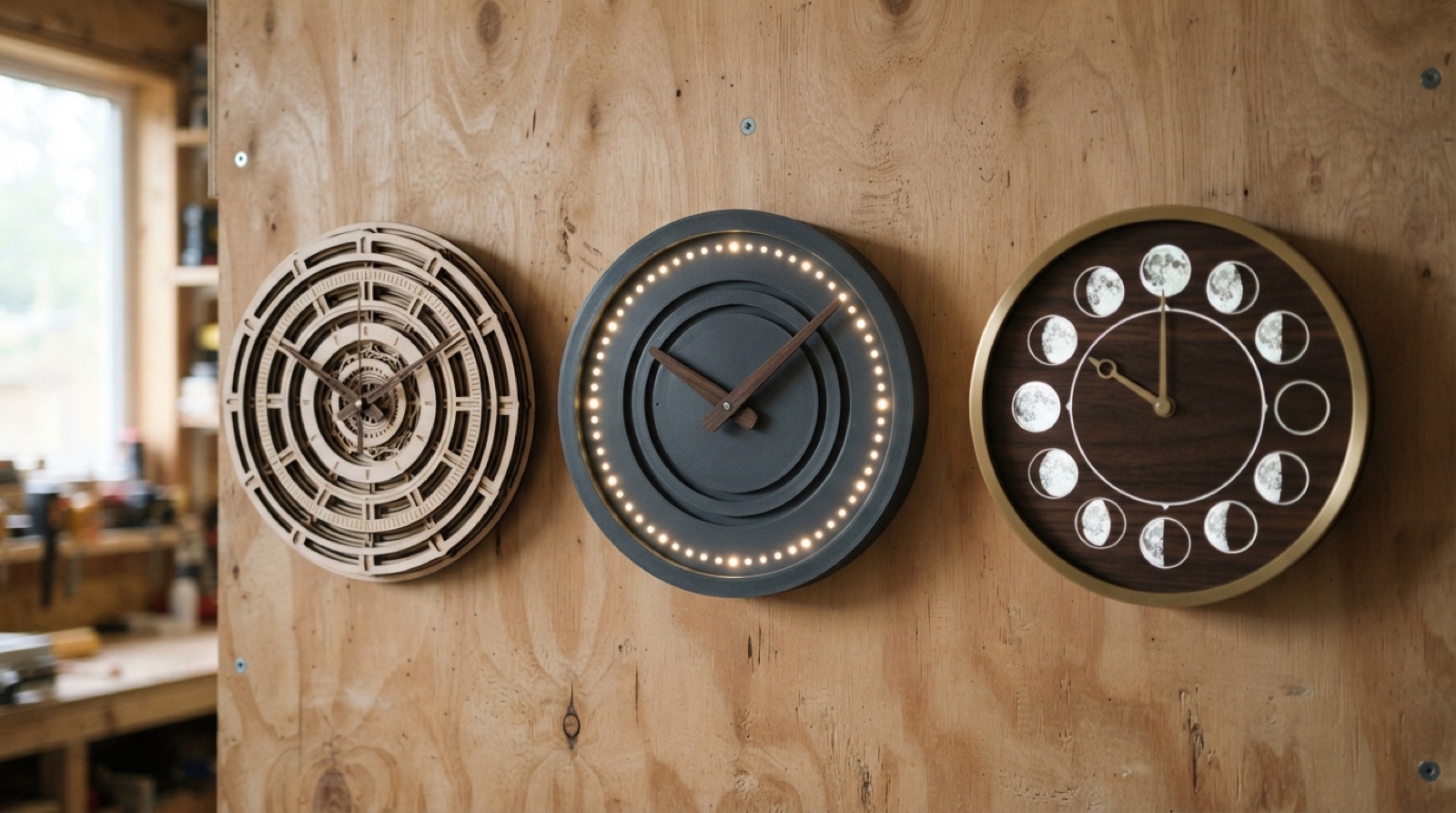
Design a clock for a wall, three ways. A laser-cut analog clock on a quartz movement; a printed clock with electronics that tells the time in a way nobody has seen; or a clock that measures something other than the hours, like the tide, the moon, a season, or a deadline. Pick one route, or one route and a twist.
Overview
A clock is the one object everyone in a room looks at, and almost nobody looks at properly. Two hands and twelve numbers is such a settled answer that it is easy to forget it is a design. It was chosen. It has a glance mode, where the angle of the hands tells you roughly where you are in the day, and a look mode, where the numbers give the minute. Any other design has to do both jobs, or decide to do only one on purpose.
This project makes a clock for a wall by one of three routes. Route one, a laser-cut analog clock on a quartz movement: the movement is a solved problem, so all the design is in the dial, the hands, the depth and the legibility. Route two, a printed clock with electronics that tells the time in a new way: one hand and a ring of light, a bar that fills, a word that changes, a flap that drops, a colour that shifts across the day. Route three, a clock that measures something other than the hours: the tide at a beach you know, the moon, the season, the light left in the day, the days to something, the time since something. It still has to be readable at a glance and true when you check.
Whatever the route, the clock hangs on a wall, runs on its own, and someone who has never seen it can read it in a few seconds after one explanation.
Skills needed
- How a clock tells you the timeA clock is a display of a number that changes. Hands on a dial, a ring of light, a word, a colour, a position. Decide what a glance gives and what a closer look gives.
- Quartz movements and handsShaft length versus dial thickness, hand sets and their weight limits, the hanging hook, the battery door. Cheap and reliable if the dial is within spec.
- Layered laser-cut dialsStacked plywood and acrylic for depth, engraved and cut numerals, a bezel, a registration system so the layers align.
- Keeping time electronicallyA real-time clock module keeps time through power loss; an ESP32 can set itself from the internet. A state machine drives what you show and when it changes.
- Moving and lighting thingsStepper motors and gears for slow hands, servos for flags and flaps, addressable LEDs for rings and bars, a small display for a word or a number.
- Enclosures and mountingA printed or laser-cut case that hides the movement or the electronics, hangs flat and level, and lets the battery or cable be reached without tools.
- Reading other kinds of timeWhere tide tables, sunrise and sunset, moon phase and season data come from, and how to turn a date into a position on a dial.
Assessment
| Criterion | Developing | Proficient | Exemplary |
|---|---|---|---|
| Brief and concept | A clock, no reason | Route chosen for a person and a place; glance and look modes defined | The display idea is new to the people who test it and they still read it |
| Legibility | Readable only up close, or only with explanation | Read correctly from 3 m by three people after one explanation | Read correctly by someone with no explanation |
| CAD and files | Not parametric; parts do not fit | Parametric dial and case; cut or print files match the model | Same file makes a bigger or smaller clock cleanly |
| Build | Warped, misaligned, movement loose, wires visible | Flat, aligned, movement or electronics fixed, back tidy | Finish and depth look designed; the hanging is invisible and level |
| Timekeeping | Drifts, stops, or wrong | Within a minute a day; or tracks its subject against a reference | Sets itself, or corrects itself, and shows when power was lost |
| Card and test | None | Test recorded; card on the back | Test changed the design and the change is visible |
Deliverables
- A one-page brief: the route, who the clock is for, where it hangs, what a glance tells you and what a look tells you
- Three concept sketches with the display idea drawn at the size it will be seen
- The Fusion model with dial diameter, numeral size and case depth as parameters, plus cut or print files and, for electronics, a wiring diagram and the code in a repository
- The finished clock, hung on a wall, running, keeping time to within a minute a day for the analog and electronic routes, or tracking its subject correctly for the abstract route
- A legibility test from 3 m with three people, and the changes it caused
- A card on the back: how to set it, how to change the battery or power it, what it measures
Materials
- Quartz clock movement with a shaft long enough for the dial thickness, a set of hands, a AA battery
- 3 mm and 6 mm plywood, 3 mm acrylic in clear and colours, wood glue, spray adhesive
- PLA or PETG; M3 screws and heat-set inserts; a hanging keyhole or a sawtooth hanger
- Arduino Nano or ESP32, DS3231 real-time clock module, a 28BYJ-48 stepper with driver or a small servo, WS2812 LED ring or strip, a small OLED or e-paper display, a USB supply
- Sandpaper, oil or clear finish, vinyl for numerals if not engraved
Steps
Week 1: Concept
- Choose the route and the person. Where will it hang, who looks at it, what do they need from a glance and from a look.
- Look at twenty clocks, old and new, and write down for each what a glance gives and what a look gives. Notice the ones that fail at one of them.
- Sketch three concepts at the real size, on paper, and pin them on a wall. Stand 3 m away. Choose the one you can still read.
- For route 2 and 3, draw the state machine or the data flow: what the clock knows, what it shows, when it changes.
- Write the brief.
Week 2: Design
- Model the clock in Fusion. Parameters: outside diameter, dial thickness, numeral height, case depth, and the movement or board dimensions as reference bodies.
- Design the layers or the case. For layered dials, a registration pin pattern so every layer drops into place. For printed cases, a front and a back that screw together with the dial captured between them.
- Design the hanging: a keyhole or a hook pocket on the centreline above the centre of mass, and a bumper at the bottom so it hangs flat.
- For electronics, wire it on the bench and get the display working before there is a case. Set the RTC. Log a night and check drift.
- Export cut and print files. Nest the laser parts.
Week 3: Build
- Cut or print the parts. Sand every visible face before assembly. Finish the wood before the layers go together; it is impossible after.
- Assemble the layers on the registration pins with glue. Clamp flat. A dial with a bow will foul the hands.
- Fit the movement or the electronics. Check the hands clear the dial and each other through a full turn. For steppers, check the hand returns to twelve and the home sensor works.
- Fit the hanging hardware. Hang it. Check it is level with a level, not by eye.
- Set it against a reference. Photograph the time on the clock and on a phone together.
Week 4: Test and hand over
- Leave it running for a week. Check against the reference at the end and record the drift, or the tide or moon position against the table.
- Legibility test: three people, 3 m, one explanation, then ask them the time or the reading. Record what they said. Fix the dial if two of three got it wrong.
- Write the card for the back: what it measures, how to set it, how to change the battery or where the power comes from.
- Hang it where it belongs. Present it with the brief and the test.
Routes
Choose one. A twist from another route is welcome once the main route works.
Route 1: Laser-cut analog
A quartz movement, a hand set, and a dial you designed. The work is in legibility and depth. Layer plywood and acrylic so the numerals stand off the face, engrave a texture, cut a bezel, hide the movement in a pocket at the back. Type matters here: numerals or marks, their size at 3 m, their contrast against the face. Check the shaft length against the total dial thickness before anything is cut; the hands must clear every layer.
Variations: a 24-hour dial; a dial with no numerals that still reads; a clock with a second dial for another time zone on the same movement; a dial cut from a map of a place, with the hands over it.
Route 2: Printed clock with electronics
A microcontroller, a real-time clock module, and a display you invented. One hand driven by a stepper and a ring of LEDs for the minutes. A bar of light that fills from sunrise to sunset. A colour that moves through the day. A set of flaps or discs turned by servos. An e-paper panel that shows the time as a word. The state machine decides what changes when; the RTC keeps it honest through power cuts; an ESP32 can fetch the time from the network so it never needs setting.
Design the printed case for the electronics you have: a pocket for the board, a channel for the cable, a diffuser in front of the LEDs, a bearing for anything that rotates. Print the diffuser in white at one or two walls with no infill.
Route 3: Other kinds of time
A clock that measures something the wall clock ignores. Tide: a hand that goes around twice a lunar day, set to the tide table for one place. Moon: a disc that turns once in 29.5 days. Season: a hand that takes a year. Daylight: a bar that shows how much light is left today, from sunrise and sunset for your latitude. Deadline: days to something, counting down. Since: days from something, counting up. A slow clock can run on a quartz movement with the gears changed, or on a stepper that moves once an hour. The dial has to say what it measures without a label being the only way to know.
Get the data right. Tide tables and sunrise times come from published sources for a real place; the moon has a known period; a countdown has a real date. Check the clock against the reference on the day it goes up and again a week later.
Stretch options
- A clock that shows two kinds of time at once, hours on one layer and daylight or tide on another, and still reads.
- A family of three clocks from the same parametric file at three sizes.
- A clock that knows when the power was lost and shows it until it is set.
- A mechanical route: design the gear train that turns a quartz second-hand shaft into a hand that takes a day, a month or a year.